> For the complete documentation index, see [llms.txt](https://help.dedust.io/en/llms.txt). Markdown versions of documentation pages are available by appending `.md` to page URLs; this page is available as [Markdown](https://help.dedust.io/en/ru/trade/coins.md).
# Coins
DeDust makes users research efforts smoother, granting them all relevant tools in one place.
{% hint style="success" %}
To simplyfi the interaction, consider that *'coin'*, *'token'* and *'jetton'* are all equal terms.
{% endhint %}
## How to find any coin on TON
{% columns %}
{% column width="50%" valign="middle" %}
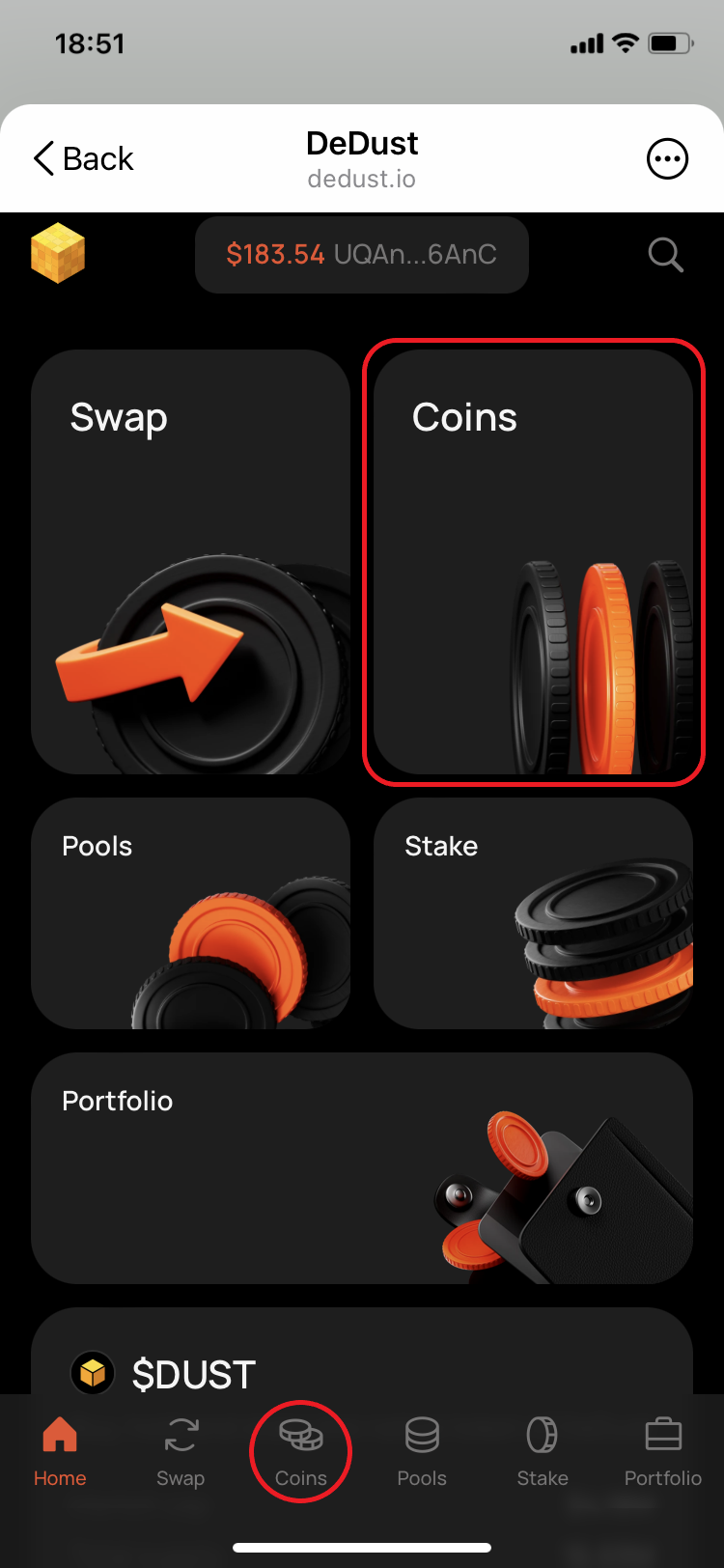
1. Open [Coins](https://dedust.io/coins) page.
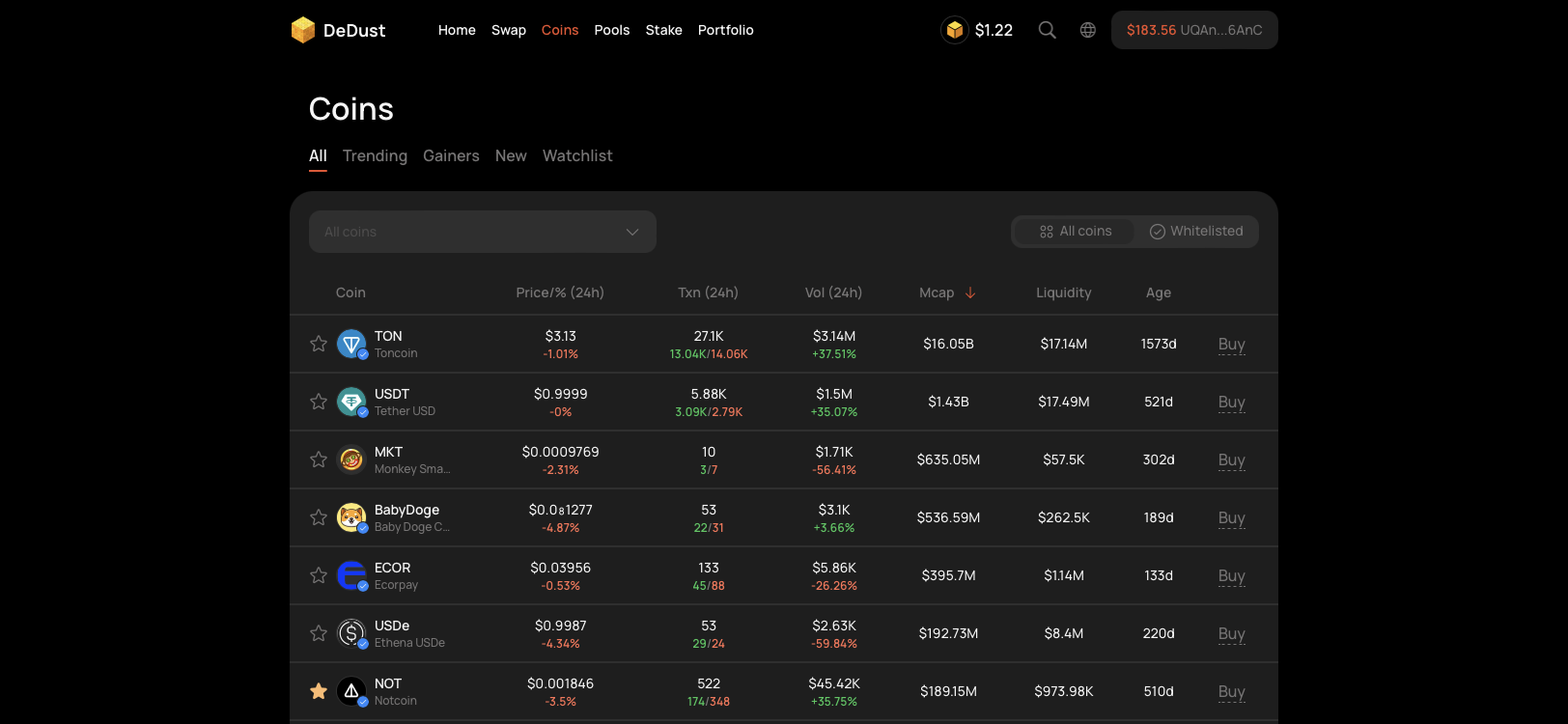
2. Explore the coins from default '**All**' tab.
{% hint style="info" %}
All tokens tradable on all TON DEXes and popular TON memepads are shown here.
{% endhint %}
3. Assets are grouped into separate tabs. Track Top-100 coins based on preferred criteria and timeframe:
* [**Trending**](/en/ru/trade/coins/tabs.md#trending) — most actively traded tokens.
* [**Gainers**](/en/ru/trade/coins/tabs.md#gainers) — jettons with increasing value.
* [**New**](/en/ru/trade/coins/tabs.md#new) — recently created coins.
4. Use [**Watchlist**](/en/ru/trade/coins/watchlist.md) — to track coins you like.
{% endcolumn %}
{% column width="50%" valign="middle" %}
{% endcolumn %}
{% endcolumns %}
5. Switch between ***All types*** and only ***Whitelisted*** coins. Use filtering and sorting options, if necessary.
6. Press any token to open [**Coin summary**](/en/ru/trade/coins/summary.md) and see its price chart, other metrics, contract address, holders, latest trades and additional data
7. Press star button to add coin to Watchlist. Or press **'Buy'** to go to [Swap](https://dedust.io/swap) and trade the selected token.
{% hint style="success" %}
The ***Whitelisted*** filter displays only tokens that have been verified through the [Whitelisting procedure](/en/ru/launch/whitelist.md).
{% endhint %}
{% hint style="warning" %}
The ***All coins*** filter shows all existing coins on TON, including [**Risky**](#user-content-fn-1)[^1] and [**Dangerous**](#user-content-fn-2)[^2] ones.
Always DYOR[^3] prior to buying any.
{% endhint %}
{% hint style="info" %}
By default coins on all tabs are sorted in a way that **Trusted** (whitelisted) and other usual tokens (with no indication) are always shown first. **Risky** and **Dangerous** tokens are always shown in the end of coins list.
{% endhint %}
[^1]: Like:
* tokens with custom logic, including inbuilt fees (called also 'tax fee'),
* mintable tokens, with potentially unlimited supply or changeable contract code,
* tokens with extremely low liquidity, etc.
[^2]: Most probably scam tokens, including:
* 'honeypots' — tokens unable to sell, or with extremely high tax fee, up to 100%
* 'rug pulls' — tokens where all the liquidity is withdrawn by the token creator
* fake copies of popular and trusted coins (or projects), etc.
[^3]: Do Your Own Research
 [**Risky**](#user-content-fn-1)[^1] and
  [**Dangerous**](#user-content-fn-2)[^2] ones.
Always DYOR[^3] prior to buying any.
{% endhint %}
{% hint style="info" %}
By default coins on all tabs are sorted in a way that **Trusted** (whitelisted) and other usual tokens (with no indication) are always shown first. **Risky** and **Dangerous** tokens are always shown in the end of coins list.
{% endhint %}
[^1]: Like:
* tokens with custom logic, including inbuilt fees (called also 'tax fee'),
* mintable tokens, with potentially unlimited supply or changeable contract code,
* tokens with extremely low liquidity, etc.
[^2]: Most probably scam tokens, including:
* 'honeypots' — tokens unable to sell, or with extremely high tax fee, up to 100%
* 'rug pulls' — tokens where all the liquidity is withdrawn by the token creator
* fake copies of popular and trusted coins (or projects), etc.
[^3]: Do Your Own Research
[**Dangerous**](#user-content-fn-2)[^2] ones.
Always DYOR[^3] prior to buying any.
{% endhint %}
{% hint style="info" %}
By default coins on all tabs are sorted in a way that **Trusted** (whitelisted) and other usual tokens (with no indication) are always shown first. **Risky** and **Dangerous** tokens are always shown in the end of coins list.
{% endhint %}
[^1]: Like:
* tokens with custom logic, including inbuilt fees (called also 'tax fee'),
* mintable tokens, with potentially unlimited supply or changeable contract code,
* tokens with extremely low liquidity, etc.
[^2]: Most probably scam tokens, including:
* 'honeypots' — tokens unable to sell, or with extremely high tax fee, up to 100%
* 'rug pulls' — tokens where all the liquidity is withdrawn by the token creator
* fake copies of popular and trusted coins (or projects), etc.
[^3]: Do Your Own Research